Wi-Fi or network cable: why both are essential at home
Published
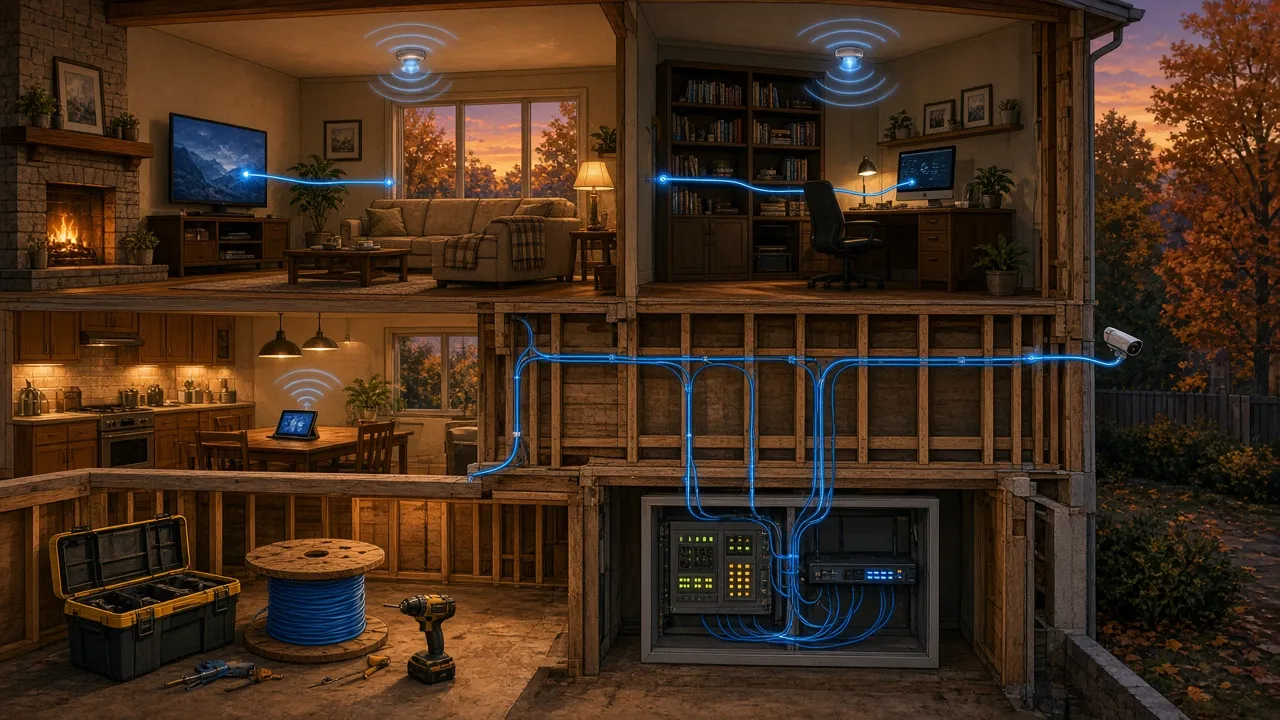
Today, almost all our devices connect to the Internet wirelessly.
Phones, tablets, TVs, computers, cameras and smart devices all use Wi-Fi.
So why install network cables in a house?
Because Wi-Fi and network cabling are not competitors. They complement each other.
And when you build or renovate a house, planning a few network cables can make a huge difference.
📡 Wi-Fi: convenient, but not magic!
Wi-Fi lets you connect your devices without using cables.
It is extremely convenient, especially for mobile devices.
But the Wi-Fi signal has to go through walls, floors and sometimes several storeys.
Its quality can be affected by:
- the distance from the router;
- walls and building materials;
- your neighbours’ Wi-Fi networks;
- the number of connected devices;
- interference from other equipment.
The result: even with a very fast Internet connection, some devices may have an unstable connection.
Paying for 1 Gbit/s Internet does not guarantee that all your devices will get that speed over Wi-Fi.
🔌 Ethernet: a direct, stable connection
An Ethernet network cable connects a device directly to your network.
Picture two ways of getting around:
- Wi-Fi: you take a shared road, where traffic can vary.
- Ethernet: you have a dedicated lane between your device and your network equipment.
A cable generally offers:
- a more stable connection;
- more consistent speeds;
- less interference;
- more predictable response times;
- better reliability for devices that stay in one place.
A Category 6 (Cat 6) Ethernet cable, for example, can support 1 Gbit/s connections, and even 10 Gbit/s over shorter distances, with compatible equipment.
📺 Which devices should you plug in?
A simple rule:
If a device doesn’t move, ask yourself why it would use Wi-Fi!
Here are a few good candidates:
- Smart TVs: for video streaming.
- Desktop computers: for work, video calls and file transfers.
- Game consoles: for a stable connection and predictable response times.
- Security cameras: especially those that can use a network cable.
- Home servers and NAS: for fast access to files and backups.
- Wi-Fi access points: to improve wireless coverage throughout the house.
That last point is especially important.
📶 The best Wi-Fi often starts with a cable!
In a large house, a single Wi-Fi router is not always enough.
You can then install several Wi-Fi access points in different spots.
These devices broadcast Wi-Fi, but they are connected to the main network with Ethernet cables.
It is an excellent way to get more even coverage.
Mesh Wi-Fi systems can also work wirelessly between their units.
However, when the units are connected by cable, they no longer need to use Wi-Fi to talk to each other.
The result is usually a faster, more reliable wireless network.
🏗️ Building or renovating: think about it now!
This is probably the most important tip in this article.
When a house is being built or the walls are open, running network cables is relatively simple.
Once the walls are finished, the job often becomes more complicated and more expensive.
A few good practices:
- Plan Ethernet outlets near TVs and work areas.
- Run cables to the places where Wi-Fi access points might go.
- Plan for future needs: cameras, an office, a finished basement, etc.
- Bring the cables together in a central, accessible and ventilated spot.
- Choose Cat 6 cabling for a new residential installation.
- Where possible, plan conduits so you can add or replace cables later.
Another advantage: some equipment can get its power directly through the network cable.
This technology is called PoE (Power over Ethernet).
It is used in particular to power compatible cameras and Wi-Fi access points.
💰 Is it worth it?
It all depends on your house and your needs.
You don’t need to install a network outlet in every corner of every room.
But during construction or a major renovation, planning a few extra cables is often a worthwhile investment.
The cost of the cables is generally modest compared with the work needed to install them once the walls are closed.
And unlike a Wi-Fi router that gets replaced after a few years, well-installed network cabling can serve you for many years.
🍳 The simple version
Wi-Fi is ideal for mobile devices.
Ethernet cable is ideal for devices that stay put.
And above all, good network cabling also gives you better Wi-Fi!
If you are building or renovating a house, take the opportunity to install network cables in strategic spots.
You don’t need to plug everything in right away.
But the day you need it, you’ll be glad you planned ahead!
The best home network isn’t 100% Wi-Fi or 100% wired. It’s a smart combination of both.
To go further
☁️ luc.cloud — Tech, simply.